10. Action
หลังจากที่เราได้ศึกษา Service ในบทที่ 8 ซึ่งใช้สำหรับการ Request ข้อมูลและรอ Result แบบ Request-Response ไปแล้ว ในบทที่ 9 นี้ เราจะมาเรียนรู้เกี่ยวกับ Action ซึ่งเป็นกลไกการสื่อสารที่ช่วยให้สามารถ สั่งงานแบบใช้เวลาในการดำเนินการ (Long-Running Task) ได้ เช่น การนำทางหุ่นยนต์ไปยังตำแหน่งที่กำหนด, การควบคุมแขนกลให้หยิบจับวัตถุ, การดำเนินการที่ใช้เวลาหลายวินาที เช่น การสแกนพื้นที่หรือการคำนวณเส้นทาง บทนี้จะสาธิตวิธีการสร้างไฟล์และการใช้งาน Action เบื้องต้น ให้ผู้อ่านเข้าใจหลักการทำงานพื้นฐาน
10.1. ความเข้าใจเกี่ยวกับ Action ใน ROS 2
Action เป็นโครงสร้างที่ พัฒนาขึ้นมาจาก Service เพื่อรองรับงานที่ใช้เวลาในการดำเนินการนาน และต้องมี การอัปเดตสถานะระหว่างดำเนินงาน (Feedback)
สำหรับ Service: Client จะส่ง Request แล้วรอ Result (แค่ Result เดียว)
สำหรับ Action: Client ส่ง Goal Request →จะได้รับ Feedback ระหว่างทำงาน → และจะสิ้นสุดเมื่อ Server ส่ง Result กลับมา
องค์ประกอบของ Action องค์ประกอบของ ROS2 Service
องค์ประกอบ |
คำอธิบาย |
|---|---|
Action Server |
Node ที่รับคำขอจาก Client และดำเนินการจนจบ |
Action Client |
Node ที่ร้องขอให้ Server ทำงาน และสามารถรับ Feedback ได้ |
Goal |
ค่าที่ส่งไปให้ Server เพื่อกำหนดคำสั่ง |
Feedback |
ข้อมูลสถานะที่ Server ส่งกลับมาให้ Client ระหว่างดำเนินการ |
Result |
Result สุดท้ายของงาน |
10.2. สร้าง Action Server
สร้างไฟล์ action_server.py
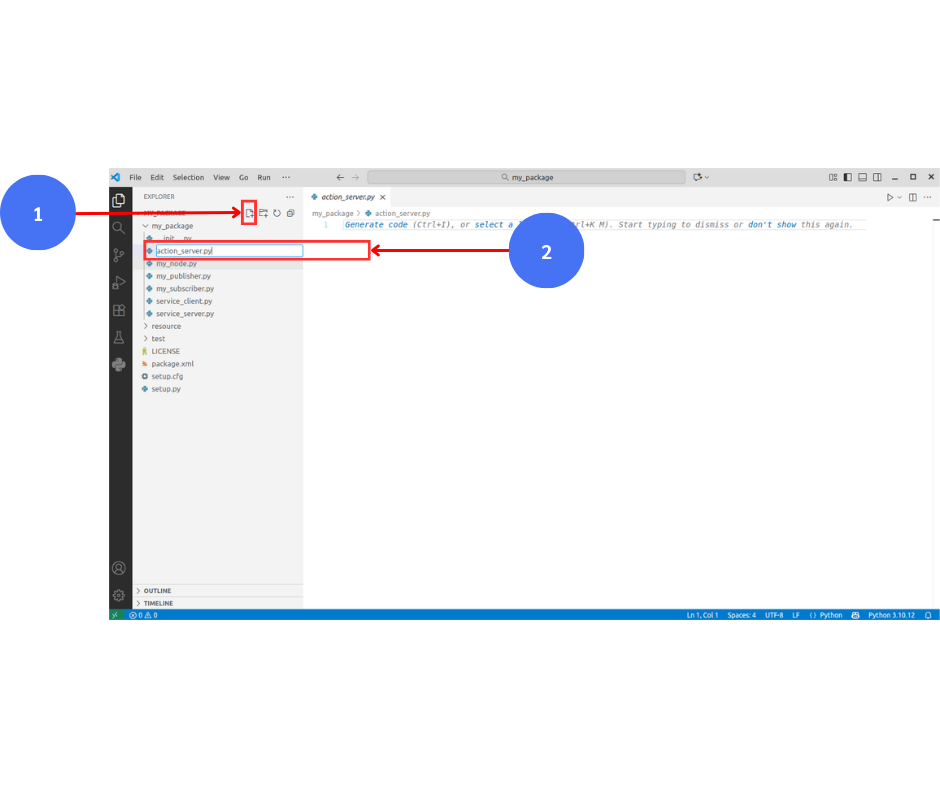
เขียนโค้ดลงในไฟล์ action_server.py จากนั้นกด Save
import time
import rclpy
from rclpy.node import Node
from rclpy.action import ActionServer
from example_interfaces.action import Fibonacci

def main():
    rclpy.init()
    node = Node('simple_fibo_server')

    def execute(goal_handle):
        n = goal_handle.request.order
        result = Fibonacci.Result()
        seq = [0, 1]
        for i in range(2, n):
            seq.append(seq[-1] + seq[-2])
            time.sleep(0.2)
        result.sequence = seq[:n]
        goal_handle.succeed()
        node.get_logger().info(f'Done: {result.sequence}')
        return result

    ActionServer(node, Fibonacci, 'fibonacci', execute)
    node.get_logger().info('Simple Fibonacci Server ready')
    rclpy.spin(node)
    rclpy.shutdown()

if __name__ == '__main__':
    main()
คำอธิบายโค้ด
นำเข้าโมดูลที่จำเป็น
import time
import rclpy
from rclpy.node import Node
from rclpy.action import ActionServer
from example_interfaces.action import Fibonacci
rclpy : ไลบรารีหลักของ ROS 2 สำหรับภาษา Python
Node : ใช้ในการสร้างโหนด (Node) ของ ROS 2
ActionServer : ใช้สร้าง Action Server
Fibonacci : เป็น Action Type มาตรฐานจาก example_interfaces ใช้สำหรับทดสอบระบบ Action
สร้าง Action Server
def main():
    rclpy.init()
    node = Node('simple_fibo_server')

    def execute(goal_handle):
        n = goal_handle.request.order
        result = Fibonacci.Result()
        seq = [0, 1]
        for i in range(2, n):
            seq.append(seq[-1] + seq[-2])
            time.sleep(0.2)
        result.sequence = seq[:n]
        goal_handle.succeed()
        node.get_logger().info(f'Done: {result.sequence}')
        return result

    ActionServer(node, Fibonacci, 'fibonacci', execute)
    node.get_logger().info('Simple Fibonacci Server ready')
    rclpy.spin(node)
    rclpy.shutdown()
rclpy.init() : เริ่มต้นการทำงานของ ROS 2
node = Node('simple_fibo_server') : สร้างโหนดชื่อ simple_fibo_server
ActionServer(...) : ใช้สร้าง Action Server โดยมีพารามิเตอร์หลักดังนี้
ชื่อโหนด (node)
ประเภทของ Action (Fibonacci)
ชื่อ Action ('fibonacci')
ฟังก์ชัน callback (execute) ที่ทำงานเมื่อได้รับ goal จาก client
ฟังก์ชัน execute (Callback)
    def execute(goal_handle):
        n = goal_handle.request.order
        result = Fibonacci.Result()
        seq = [0, 1]
        for i in range(2, n):
            seq.append(seq[-1] + seq[-2])
            time.sleep(0.2)
        result.sequence = seq[:n]
        goal_handle.succeed()
        node.get_logger().info(f'Done: {result.sequence}')
        return result
goal_handle.request.order : รับค่าจำนวนลำดับของ Fibonacci จาก Client
สร้างลิสต์ seq สำหรับเก็บผลลัพธ์ลำดับ Fibonacci
ใช้ลูป for เพื่อคำนวณค่าลำดับที่เหลือ
time.sleep(0.2) : หน่วงเวลาให้เห็นการทำงานแบบทีละขั้นตอน (เพื่อการสาธิต)
goal_handle.succeed() : แจ้งว่า Action เสร็จสมบูรณ์
return result : ส่งผลลัพธ์กลับไปยัง Client
ฟังก์ชัน execute (Callback)
if __name__ == '__main__':
    main()
ใช้เพื่อเรียกฟังก์ชัน main() เมื่อไฟล์นี้ถูกรันโดยตรง
ระบบจะเริ่มต้น Node และเปิด Action Server เพื่อรอรับคำสั่งจาก Client
สรุป โค้ดนี้เป็นตัวอย่าง Action Server ที่ใช้ example_interfaces/action/Fibonacci ซึ่งเป็น Action มาตรฐานใน ROS 2
เมื่อ Client ส่ง Goal (เช่น จำนวนลำดับที่ต้องการคำนวณ) มายัง Server
Server จะคำนวณลำดับ Fibonacci ตามจำนวนที่กำหนด
หลังจากคำนวณเสร็จ จะส่งผลลัพธ์ (Result) กลับไปยัง Client
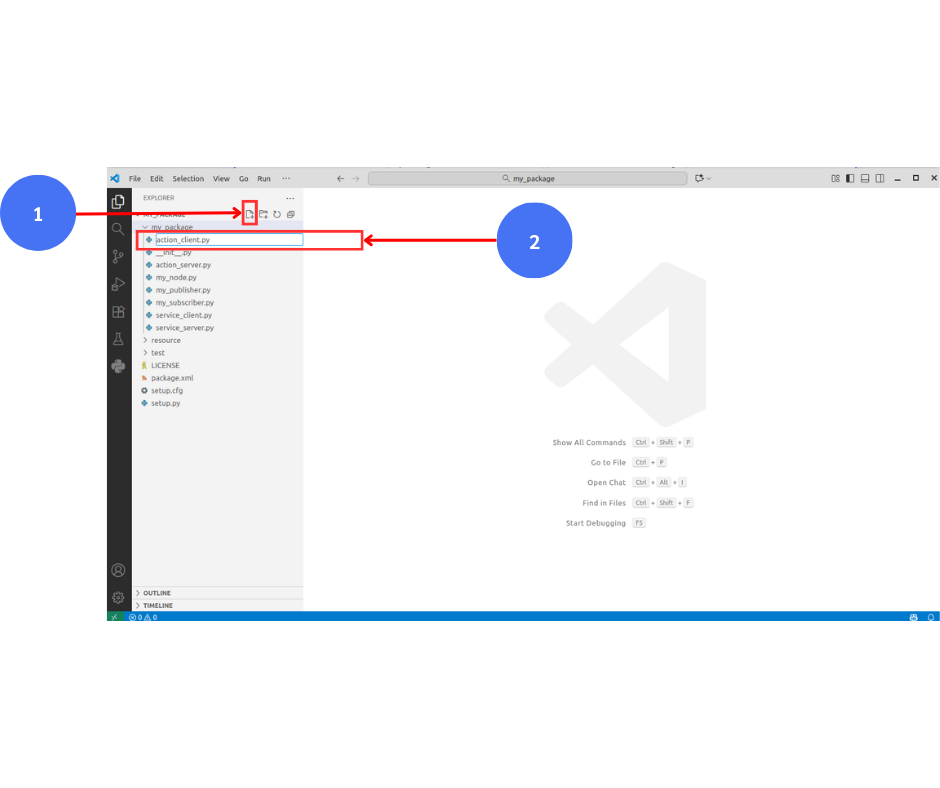
เขียนโค้ดลงในไฟล์ action_client.py จากนั้นกด Save
import rclpy
from rclpy.node import Node
from rclpy.action import ActionClient
from example_interfaces.action import Fibonacci

def main():
    rclpy.init()
    node = Node('simple_fibo_client')
    client = ActionClient(node, Fibonacci, 'fibonacci')

    client.wait_for_server()
    node.get_logger().info('Connected to Fibonacci Server')

    goal = Fibonacci.Goal()
    goal.order = 8

    future = client.send_goal_async(goal)
    rclpy.spin_until_future_complete(node, future)
    goal_handle = future.result()

    if not goal_handle.accepted:
        node.get_logger().info('Goal rejected')
        return

    result_future = goal_handle.get_result_async()
    rclpy.spin_until_future_complete(node, result_future)
    result = result_future.result().result
    node.get_logger().info(f'Result: {list(result.sequence)}')

    node.destroy_node()
    rclpy.shutdown()

if __name__ == '__main__':
    main()
คำอธิบายโค้ด
นำเข้าโมดูลที่จำเป็น
import rclpy
from rclpy.node import Node
from rclpy.action import ActionClient
from example_interfaces.action import Fibonacci
rclpy : ไลบรารีหลักของ ROS 2 สำหรับภาษา Python
Node : ใช้สร้างโหนด (Node)
ActionClient : ใช้สร้าง Action Client สำหรับส่ง Goal ไปยัง Server
Fibonacci : Action Type มาตรฐานจาก example_interfaces สำหรับทดสอบการทำงานของระบบ Action
สร้างฟังก์ชัน main และเริ่มต้น Node
def main():
    rclpy.init()
    node = Node('simple_fibo_client')
    client = ActionClient(node, Fibonacci, 'fibonacci')
rclpy.init() : เริ่มต้นการทำงานของ ROS 2
node = Node('simple_fibo_client') : สร้างโหนดชื่อ simple_fibo_client
ActionClient(node, Fibonacci, 'fibonacci') :
สร้าง Action Client โดยระบุ
ชื่อโหนด (node)
ประเภทของ Action (Fibonacci)
ชื่อ Action ('fibonacci') ที่ต้องตรงกับชื่อในฝั่ง Server
รอให้ Server พร้อมก่อนส่ง Goal
    client.wait_for_server()
    node.get_logger().info('Connected to Fibonacci Server')
wait_for_server() : ให้ Client รอจนกว่า Server จะพร้อมรับคำสั่ง
เมื่อเชื่อมต่อสำเร็จ ระบบจะแสดงข้อความว่าเชื่อมต่อได้แล้ว
สร้าง Goal และส่งไปยัง Server
    goal = Fibonacci.Goal()
    goal.order = 8

    future = client.send_goal_async(goal)
    rclpy.spin_until_future_complete(node, future)
    goal_handle = future.result()
Fibonacci.Goal() : กำหนดข้อมูล Goal ที่จะส่งให้ Server
goal.order = 8 : กำหนดให้ Server คำนวณลำดับ Fibonacci จำนวน 8 ตัว
send_goal_async(goal) : ส่ง Goal ไปยัง Server แบบ asynchronous
rclpy.spin_until_future_complete(...) : รอจนกว่าการส่ง Goal จะเสร็จ
goal_handle = future.result() : เก็บข้อมูลการตอบรับจาก Server
ตรวจสอบว่า Goal ถูกยอมรับหรือไม่
        if not goal_handle.accepted:
        node.get_logger().info('Goal rejected')
        return
ตรวจสอบว่าฝั่ง Server ยอมรับคำสั่ง (Goal) หรือไม่
ถ้าไม่ยอมรับ จะหยุดการทำงานทันที
รอผลลัพธ์ (Result) จาก Server
    result_future = goal_handle.get_result_async()
    rclpy.spin_until_future_complete(node, result_future)
    result = result_future.result().result
    node.get_logger().info(f'Result: {list(result.sequence)}')
get_result_async() : รอรับผลลัพธ์ (Result) จาก Server
spin_until_future_complete() : รอจนกว่าผลลัพธ์จะถูกส่งกลับมา
result.sequence : ข้อมูลลำดับ Fibonacci ที่ Server คำนวณเสร็จแล้ว
แสดงผลลัพธ์ทางหน้าจอ
ปิด Node และ ROS 2
    node.destroy_node()
    rclpy.shutdown()
        return
destroy_node() : ปิดการทำงานของโหนด
rclpy.shutdown() : ปิดระบบ ROS 2 อย่างสมบูรณ์
ส่วนเรียกโปรแกรมหลัก
if __name__ == '__main__':
    main()
ใช้เรียกฟังก์ชัน main() เมื่อไฟล์นี้ถูกรันโดยตรง
สรุป โค้ดนี้เป็นตัวอย่างของ Action Client ใน ROS 2 ที่ใช้ Action มาตรฐาน example_interfaces/action/Fibonacci เพื่อส่ง Goal ไปยัง Server ให้คำนวณลำดับ Fibonacci และ แสดงผลลัพธ์เมื่อได้รับข้อมูลครบจากฝั่ง Server
10.3. ทดสอบการทำงานของ Action
ตั้งค่า setup.py ใน VS Code เพิ่ม
'action_server = my_package.action_server:main',
'action_client = my_package.action_client:main',
หลังจากนั้นกด Save
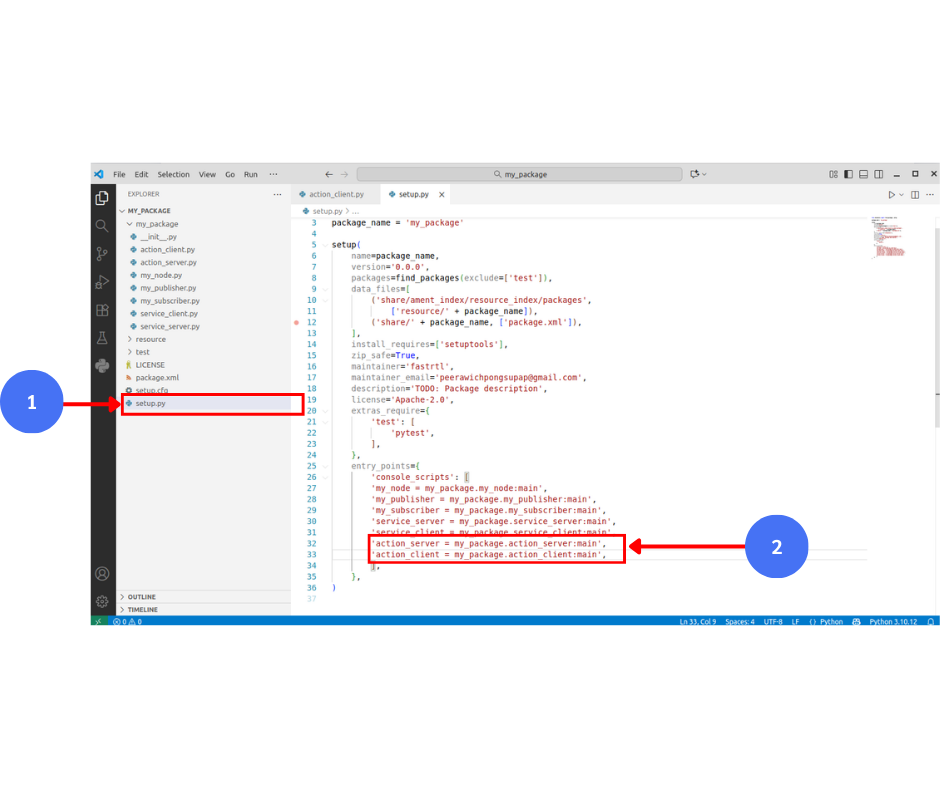
เปิด Terminal คอมไพล์
cd ~/ros2_ws
colcon build
เปิด Terminal ใหม่ รัน Service Server
ros2 run my_package action_server
เปิด Terminal ใหม่ รัน Action Client เพื่อทดสอบ
ros2 run my_package action_client
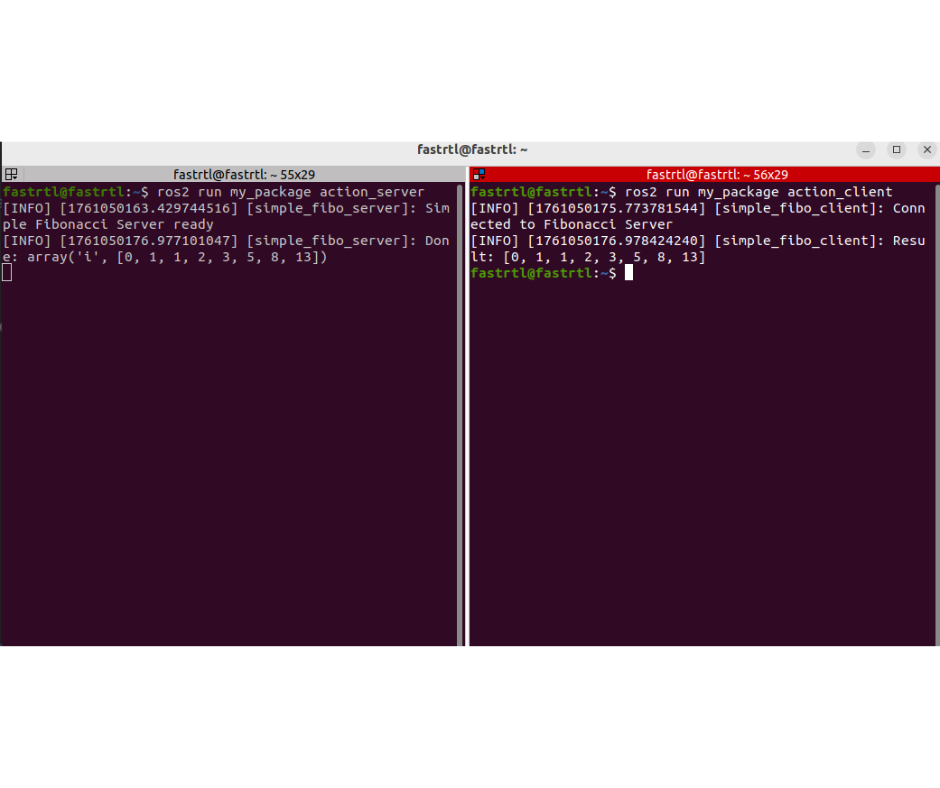
ผลการทำงาน
Action Server (ฝั่งซ้าย)
เมื่อเริ่มทำงาน จะแสดงใน log ว่า Simple Fibonacci Server ready แปลว่าเซิร์ฟเวอร์พร้อมรับคำสั่ง (Goal) จาก Client
เมื่อ Action Client ส่ง Goal เข้ามา โดยกำหนด order = 8 (จำนวนลำดับฟีโบนัชชีที่ต้องการ)
Action Server จะคำนวณลำดับฟีโบนัชชีตามจำนวนที่ร้องขอ
เมื่อคำนวณเสร็จ Server จะตั้งสถานะสำเร็จ (succeed()) และพิมพ์ใน log ว่า
Done: [0, 1, 1, 2, 3, 5, 8, 13] ซึ่งเป็นผลลัพธ์ที่พร้อมส่งกลับไปยัง Client
Action Client (ฝั่งขวา)
Client จะรอจนเชื่อมต่อกับ Server ได้ และพิมพ์ใน log ว่า Connected to Fibonacci Server
จากนั้น Client ส่ง Goal ไปยัง Server โดยกำหนด order = 8
เมื่อ Server ประมวลผลเสร็จ Client จะได้รับ Result และพิมพ์ใน log ว่า Result: [0, 1, 1, 2, 3, 5, 8, 13]